Contents
10 Shopify Checkout Upsell Best Practices
You know what the most valuable moment is in your store? It is not when a shopper lands on your homepage or adds something to their cart. It is the five seconds between “Place Order” and “Thank You for your order”, the time when purchase intent is absolute, trust is at its peak, and the customer has already made the psychological commitment to buy. That window is where Shopify checkout upsells live. And most Shopify stores are leaving this crucial moment empty.
WHY? Here is the problem.
Most merchants focus their entire optimization energy on the top of the funnel, like better ads, more traffic, and a faster homepage. But they ignore the moment when revenue is easiest to capture because the hardest part is the purchase decision, which is already made.
This costs 5–25x more to acquire a new customer than to increase revenue from an existing transaction. Every customer who reaches your checkout is a paid acquisition. What you earn from that session, beyond the original order, is pure incremental return.
- Upselling and cross-selling drive 10–30% of e-commerce revenue. You can read the science behind AI-driven upselling and why it works.
- Post-purchase upsells that are shown immediately after checkout convert at 15–25%, the highest of any upsell placement.
Compare that to product page recommendations (8–15%), or in-cart upsells (5–12%), and the opportunity gap becomes impossible to ignore.
After witnessing this, we have come up with 10 data-backed Shopify checkout upsell best practices that top-performing Shopify stores use to make their checkout upsells work. As these are not an annoying friction, but are a genuinely helpful extension of the buying experience.
Shopify Checkout Upsell Benchmarks Every Merchant Should Know in 2026
Before diving into best practices, it is worth establishing what good actually looks like – specifically at the checkout stage. These numbers reflect checkout and post-checkout placements only.
Product page and cart upsells follow different psychology and perform differently, so benchmarking your checkout results against those numbers gives you a false picture of where you actually stand.
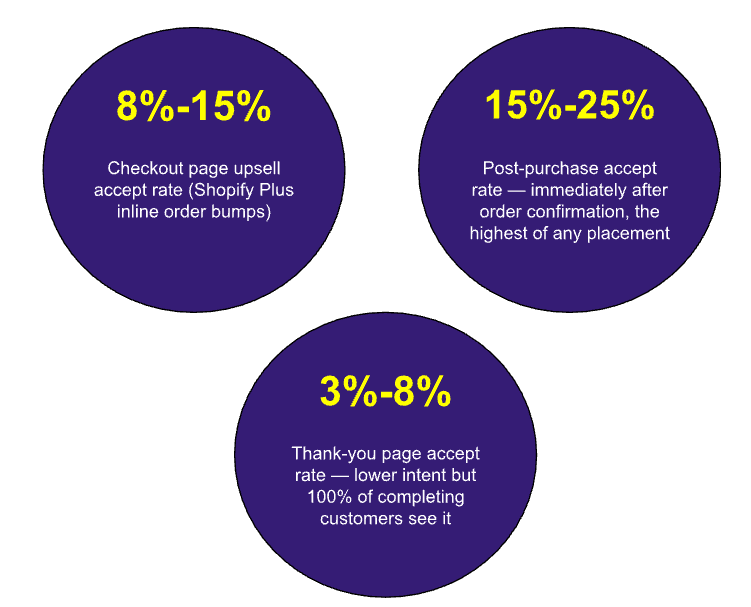
There are three distinct checkout-stage placements, each with its own intent level, accept rate, and optimal offer type:
| Shopify Checkout Upsell Acceptance Rate and Impact | |||
| Checkout Placement | Accept Rate | AOV Impact | What Makes It Work |
| Checkout page (order bump) | 8 –15% | 10–18% | Inline, frictionless, shown before “Place Order” click |
| Checkout page (Shopify Plus widget) | Up to 37.8% | 12–20% | Small-price impulse addition with one-click accept at peak commitment |
| Post-purchase Highest | 15–25% | 15–30% | Highest-intent moment — no payment re-entry required, one tap to add |
| Thank-you / order confirmation page | 3–8% | 5–12% | Lower intent but 100% reach; also supports loyalty, referral, and next-purchase offers |
Key Points to note –
- Single-offer upsells outperform multi-offer upsells by 30–40%, this gap is most pronounced at checkout where shoppers have the least patience for additional decision-making.
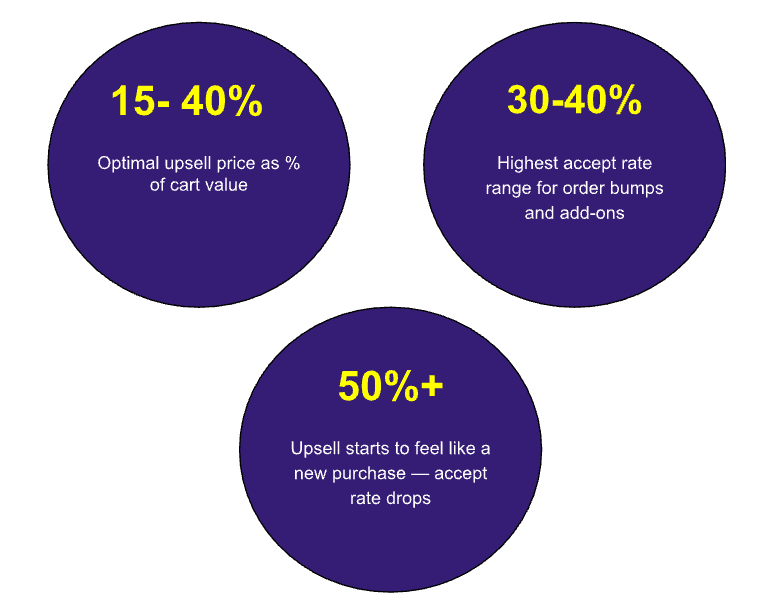
- The most effective checkout upsell pricing sits at 15–40% of cart value: a $20 upsell on a $60 cart is the sweet spot, and anything over 50% of cart value starts to feel like a new purchase decision, causing acceptance rates to fall sharply.
- The post-purchase upsell window i.e. the 30–60 seconds immediately after an order is confirmed, achieves accept rates of 15–25%, the highest of any placement in ecommerce.
- The psychological commitment is freshest, the trust is highest, and no payment re-entry is required. It is the most valuable real estate in your store that most merchants leave empty.
Check out 10 ways to optimize Shopify Store Checkout for more Conversions
What a “Good” Shopify Checkout Upsell Looks Like – By Performance Tier
| Shopify Checkout Upsell – Performance Tier | |||
| Metric to measure | Average Store | Strong Performer | Best in Class |
| Checkout page accept rate | 4–6% | 8–12% | Up to 37.8% (order bumps) |
| Post-purchase accept rate | 8–12% | 15–18% | 20–25%+ |
| Thank-you page accept rate | 2–4% | 4–6% | 6–8% |
| Checkout upsell revenue as % of store revenue | 0.1–0.5% | 0.5–1.5% | 1.5–3%+ |
| Combined checkout-stage AOV lift | 5–10% | 10–20% | 20–30%+ |
Just Two Numbers to Keep in Mind
- It costs 5–25x more to acquire a new customer than to increase revenue from an existing transaction. Every shopper who reaches your checkout is a paid acquisition and what you earn beyond their original order from the checkout page, post-purchase step, and thank-you page is incremental revenue with zero additional acquisition cost. And,
- Upselling and AI-powered recommendations drive 10–30% of total ecommerce revenue but the checkout stage specifically is where the highest-intent, highest-converting version of that opportunity lives.
The average upsell acceptance rate is 4–8% with properly targeted offers. But stores that use AI personalization to match the upsell to each shopper’s cart and browsing history consistently see rates at the top end of this range and beyond.
10 Shopify Checkout Upsell Best Practices
- Time is everything, so time your upsell at the moment of peak purchase intent
The single most important variable in Shopify checkout upsell performance is not the product you offer or the price you set. It is When The Offer Appears.
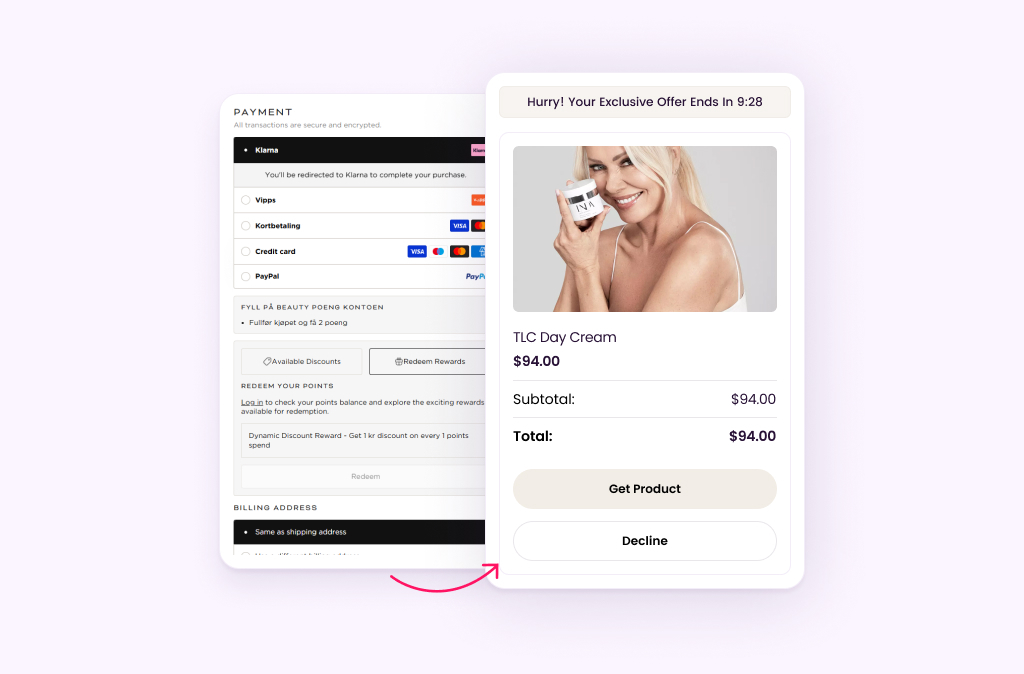
Upsells presented at the wrong moment feel like interruptions. Upsells presented at peak intent feel like helpful suggestions. In the checkout journey, purchase intent peaks twice. One at the moment a shopper enters their payment details (they have made the psychological commitment to buy), and second, in the 30–60 seconds immediately after the order is confirmed (they are experiencing a dopamine spike from making a satisfying purchase decision).
Post-purchase upsells shown immediately after checkout achieve acceptance rates of 15–25% — the highest of any upsell placement, precisely because this is the moment of maximum receptivity. Go through this ultimate guide on Post-purhase upselling to drive your Store’s AOV.
For Shopify Plus merchants, the checkout page itself is also a high-intent placement. A shopper who has entered their payment details but not yet clicked “Place Order” is as committed as they will ever be. A relevant, non-intrusive recommendation at this point can lift order value without threatening the conversion.
Across Wiser’s merchant base, checkout page widgets consistently generate 0.13–0.76% of total store revenue per month — small as a percentage but significant in absolute terms at high order volumes.
- The Pricing Psychology says, Price the Upsell at 15–40% of Cart Value, Never More
The price of a checkout upsell relative to the cart value is the most underappreciated conversion lever available. Most merchants set upsell prices based on what they want to sell rather than what the shopper’s psychology is primed to accept.
The most effective upsell pricing follows a specific psychological pattern: the upsell price should be 15–40% of cart value. A $20 upsell on a $60 cart (33%) is the sweet spot. Over 50% feels like a new purchase decision and once a shopper perceives the upsell as a new primary purchase rather than a simple add-on, your acceptance rate drops sharply.
The reason is rooted in anchoring. A shopper who has committed to a $100 cart has mentally allocated $100 to this transaction. An additional $25–35 item sits comfortably within the “already spending” frame. A $60 add-on requires them to re-evaluate their total spend as a new number and that re-evaluation often ends in a decline.
- Decision Science says – One Relevant Offer Is Better Than Five Options
One of the most consistently proven findings in e-commerce behavioural research is that choice overload kills conversion, i.e. too many choices hurt conversions. When shoppers are presented with multiple upsell options simultaneously, they experience decision paralysis and the most common resolution to paralysis is to skip the decision entirely.
Therefore, you need to reduce choices for your shoppers to increase their actions. Single-offer upsells outperform multi-offer upsells by 30–40% due to reduced decision paralysis. This is not a small margin.
A 30–40% performance difference from simply removing additional options is one of the most reliable and low-cost conversion improvements available.
The discipline required here is harder than it sounds. When you have multiple products that could logically accompany a purchase, the temptation is to show them all and let the shopper decide.
But showing three options does not multiply your chances of an acceptance rather, it divides them. Use AI to identify the single most likely add-on for each specific cart and show that one with confidence.
What to Do and What Not?
The Do’s…
- Show one AI-selected offer per Shopify checkout upsell placement
- Use your best-performing product combination from real purchase data
- If testing multiple products, A/B test them sequentially, not simultaneously
- Let the AI rotate which offer appears based on what’s in the cart
The Don’ts…
- Display 3–4 upsell options “so shoppers have a choice”
- Use a product carousel in the upsell slot. Note that it introduces browse friction
- Show the same offer to every shopper regardless of cart contents
- Repeat the same product the shopper already has in their cart
- The AI Advantage – Match the Shopper, Not Just the Product
The biggest gap between median-performing and top-performing checkout upsells is not the design, the copywriting, or the pricing. It is the Relevance.
A generic “you might also like” block with a randomly selected product will always underperform an AI-matched recommendation based on what that specific shopper has been browsing, what similar customers bought, and what complements the exact contents of the current cart.
Customers engaging with AI-driven product suggestions show 25% higher AOV than those who interact with non-personalised recommendations. That 25% AOV premium compounds across every order in your store and at scale, it represents the difference between a recommendation engine that “works” and one that genuinely drives revenue.
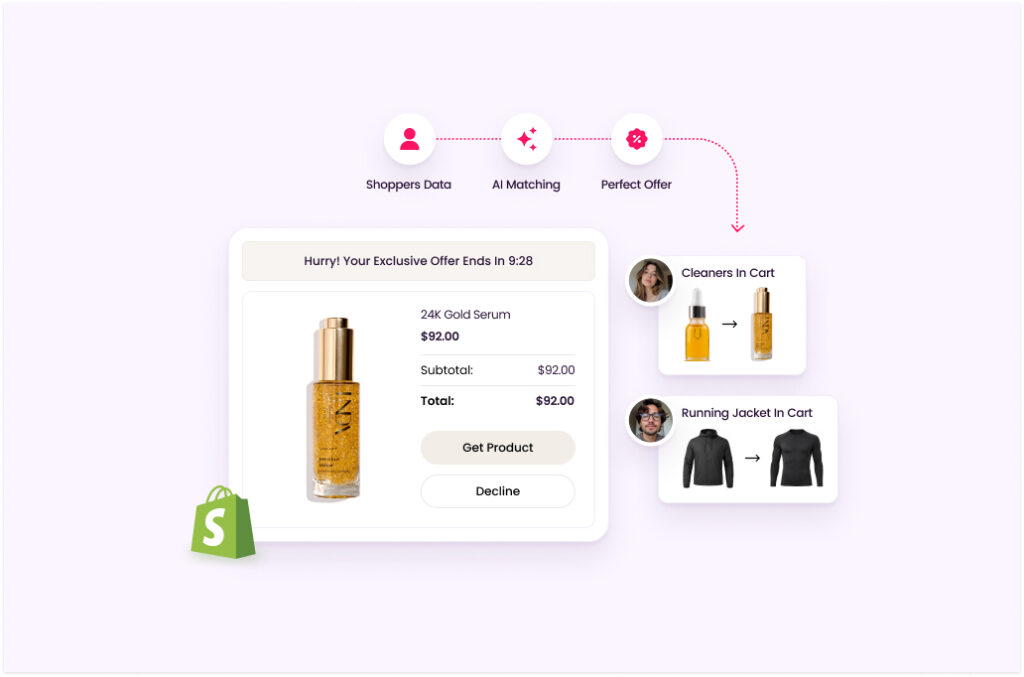
Wiser’s checkout upsell widget uses real co-purchase data from your store to identify which product is most likely to be added alongside each specific cart combination.
A shopper with a skincare cleanser in their cart might see a toner recommendation. A shopper with a running jacket sees a base layer. A shopper with a coffee grinder sees a specific blend. The offer feels like it was chosen for them because, at the AI level, it was.
The Relevance Premium
In Wiser’s data across 5,000+ Shopify stores, AI-matched checkout recommendations convert at 2–3x the rate of rule-based or manually curated upsells because they are built from what shoppers actually buy together, not from what merchandisers think they should buy together. The difference is most pronounced in stores with large, varied catalogues where manual curation is impossible to scale.
You might like to know these 9 upselling and cross-selling strategies to display Amazon-like recommendations on your store.
- Make acceptance effortless – Every extra click costs you revenue
The difference between a post-purchase upsell that converts at 20% and one that converts at 5% is often not the product or the price; it is how many clicks it takes to say yes. Every additional step between “this looks interesting” and “done, I bought it” is a point where the shopper can change their mind.
The gold standard for post-purchase upsells is a single-button acceptance that uses the payment method the shopper just used and no re-entry of card details, no new shipping address, and no confirmation screen. Just one tap. The item is added to the order. The experience is seamless.
How to do this?
- One-click add: The accept button should add the item to the existing order without redirecting the shopper away from the current page or requiring any additional input.
- No payment re-entry: Shoppers who have just confirmed their payment details should never be asked to re-enter them for an upsell. This is the single biggest friction point and the most common reason for upsell abandonment.
- Instant order confirmation: Show a confirmation that the item has been added within 1–2 seconds of acceptance. Delayed confirmations create anxiety and lead to second-guessing.
- Clear decline option: A prominent “No thanks” link is not a weakness; it reduces anxiety and makes the offer feel optional rather than coercive, which paradoxically increases accept rates by reducing resistance.
- Copywriting – Benefit First, Product Second – Show the Reward, Not the SKU
Most checkout upsell widgets display a product image, a product name, a price, and an “Add to Order” button. This is the minimum viable implementation. It works, but it leaves significant conversion potential on the table because it forces the shopper to infer why they should want this product rather than telling them directly.
The highest-converting upsell copy leads with the benefit the product delivers to the shopper, not its name or specifications. The product name is a label. The benefit is a reason to say yes.
Benefit-Led Copy
- “Complete your look – add the matching top”
- “Most customers add this to protect their purchase”
- “Get faster results — add the serum that makes this work better”
- “Frequently bought with your order — add in one tap”
Product-Led Copy
- “Moisturizing Cream SPF 30 — $28.99”
- “Product ID: SKU-4472 — Add to Order”
- “You might also like this product”
- “Recommended for you” (with no context given)
- Add Social Proof Directly Inside the Upsell Widget
A shopper at the checkout stage has already decided to buy from you, but they have not yet decided to trust the specific product you are showing them in the upsell. They have never seen it before. They did not search for it. You are asking them to make a micro-purchase decision in under 30 seconds with no prior consideration. Social proof is the shortcut that bridges that trust gap.
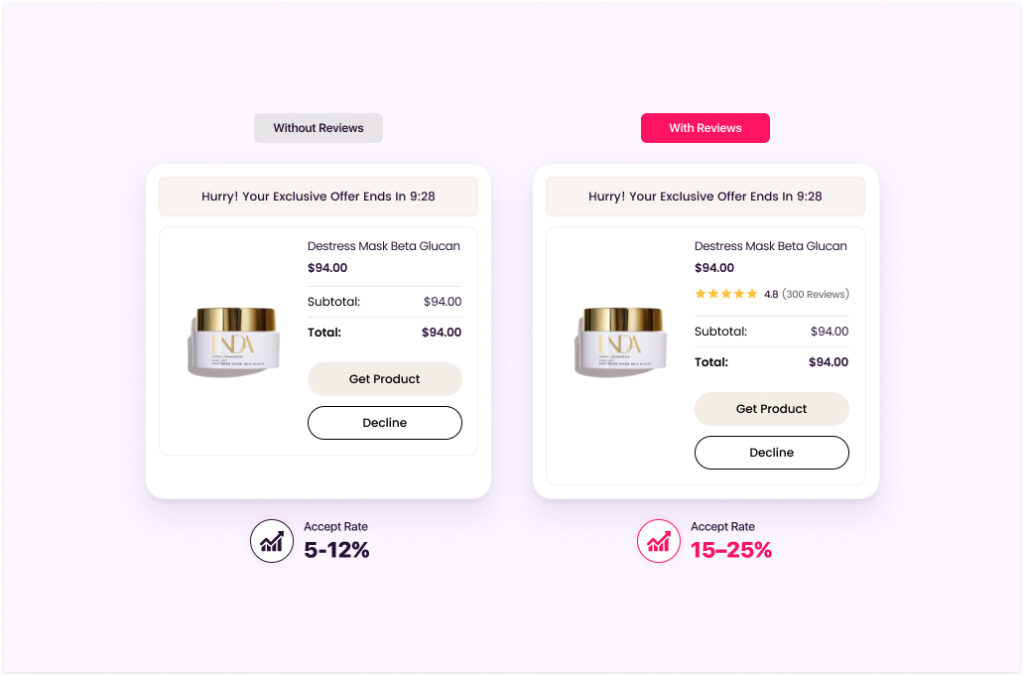
Adding a star rating and a short review snippet directly inside the upsell widget gives the shopper validation from a third party that the product is worth the impulse. [XYZ — “★★★★★ 4.8 · ‘Best add-on I’ve ever bought'” — ].
Wiser integrates with Yotpo, Loox, and Judge.me to pull live ratings into upsell widgets automatically, so this social proof layer is always current and specific to the product being shown.
Social Proof Impact on Upsell Acceptance
Adding visible star ratings to upsell offers increases accept rates by 15–25% on average compared to the same offer without ratings because the shopper doesn’t have to evaluate the product on their own. The crowd has already done it for them, and seeing 4.8 stars from 300 reviews in the same widget removes the primary source of upsell hesitation that is ” is this actually good?”
- Optimisation – A/B Test Every Variable Before Scaling
The checkout upsell benchmarks in this guide are directional; they tell you what to aim for, not what you will hit on your first attempt. Every store’s audience is different. Every catalogue has different co-purchase patterns. Every customer base has different price sensitivity. The only way to find your optimal configuration is to test systematically rather than guess comprehensively.
Small changes compound, so measure conversion rate, AOV, add-to-cart rate, checkout completion, and drop-off rates, etc. and then double down on what works. This is especially true for checkout upsells, where a 2–3% point improvement in acceptance rate translates directly into meaningful revenue at any meaningful order volume.
- Test one variable at a time: Product selection, headline copy, price point, widget placement, and image style are all valid test variables. You need to change only one per test cycle so you can attribute results accurately.
- Run for statistical significance: Do not pull conclusions from 50 orders. A/B tests need a minimum of 200–300 acceptances per variant before the data is directionally reliable.
- Measure acceptance rate and incremental revenue: Accept rate tells you what’s converting. Incremental revenue per 100 checkout sessions tells you what’s actually growing your business. So, track both.
- Use Wiser’s built-in A/B testing: Wiser’s platform lets you run A/B tests on widget configurations and product selections with automatic revenue attribution, no additional testing tool required.
You can also check out the list of best upsell apps for Shopify stores in 2026.
- Don’t Neglect the Thank-You Page – A hidden revenue page that gives you a second chance
Most Shopify merchants treat the thank-you page as a receipt, a static confirmation that the order was placed. This is one of the most expensive content mistakes in e-commerce.
The thank-you page is visited by every customer who completes an order. Literally, every single one. And most stores show them nothing worth buying. The thank-you page sits after the post-purchase upsell in the sequence, which means it is reaching shoppers who have already accepted or declined your one-click offer.
Those who accepted are in an even better buying mood, they have just made two consecutive positive decisions. Those who declined are still in your store, still on a page, still in the post-purchase window.
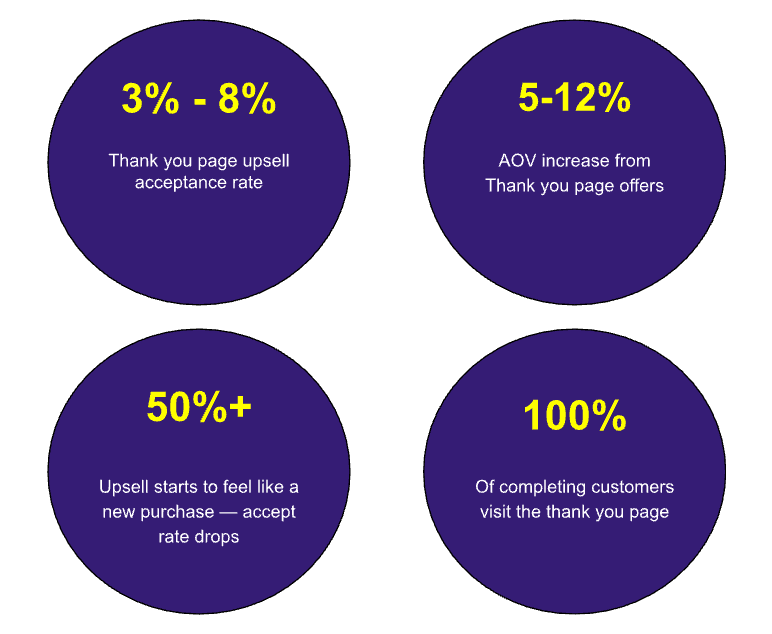
With this research data, there are still 0% of Store owners who optimize their Shopify stores enough.
The thank-you page also supports additional elements that the post-purchase upsell slot does not, such as loyalty programme enrolment, referral programme prompts, social sharing incentives, and next-purchase discount codes. When used correctly, the thank you page is not just a second upsell opportunity but the first step in the retention cycle.
- Full-Funnel Thinking – Match the Offer Type to the Checkout Stage
Checkout upsells are not a single event — they are a sequence of moments, each with a different psychology, a different level of commitment, and therefore a different optimal offer type. Treating all checkout placements as interchangeable is a common mistake that results in mismatched offers that underperform because they are asking for the wrong thing at the wrong moment.
| Shopify Checkout Upsell Types as Per Different Checkout Stages | |||
| Checkout Stage | Shopper’s Mental State | Optimal Offer Type | What to Avoid |
| Cart Page | Browsing, considering, still evaluating total spend | Low-price complementary add-ons, free shipping threshold nudge | High-priced upsells that reset the AOV frame |
| Checkout Page | Committed — has entered payment details | One small, highly relevant order bump – inline, non-intrusive | Multiple offers, long-form copy, anything that delays the click |
| Post-Purchase Peak Intent | Euphoric – has just confirmed purchase | One-click upsell for the product most commonly bought alongside the order | Unrelated products, high-price items, offers requiring re-entry of details |
| Thank-You Page | Satisfied – reviewing their order | Recommendation widgets, loyalty programme, referral offer, next-purchase discount | Repeating the same offer they just declined in the post-purchase step |
The stores that consistently outperform on checkout upsell metrics are the ones that think about this sequence holistically. Using each stage to set up the next, matching the offer type to the psychological state, and ensuring that a decline at one stage does not mean the customer sees nothing of value at the next stage.
Wiser merchants who activate recommendation widgets across 3+ touchpoints (product page, cart, and post-purchase) generate 40–60% more total recommendation revenue than merchants using a single placement.
The compounding effect of catching shoppers at multiple intent stages, each with a relevant, well-timed offer, is the core argument for a full-funnel approach over a single-widget setup.
The Revenue Benchmarks Every Shopify Store Should Track in 2026
If your Shopify store checkout upsells are not yet hitting these numbers, you have clear room to improve, and the ten practices above tell you exactly where to start.
| Shopify Checkout Upsell Benchmark 2026 | |||
| Metric | Median (Average Store) | Top 25% (Strong Performer) | Top 10% (Best in Class) |
| Checkout upsell acceptance rate | 4–6% | 8–12% | 15–25% |
| AOV lift from upsells | 5–10% | 10–20% | 20–30%+ |
| Upsell revenue as % of store revenue | 1–3% | 3–6% | 8–15% |
| Post-purchase accept rate | 8–12% | 15–20% | 20–25%+ |
| Thank-you page accept rate | 2–4% | 4–6% | 6–10% |
Read, How Shopify Cart Drawer upsells and checkout upsell boosts AOV by 25%
Checkout upsells are one of the easiest ways to increase revenue without spending more on customer acquisition. The most successful stores treat checkout, post-purchase, and thank-you pages as revenue opportunities rather than simple transaction steps.
By showing the right offer at the right moment, keeping the experience frictionless, and using AI-driven personalization, Shopify merchants can consistently improve both conversion rates and average order value.
Start with a few of these Shopify checkout upsell best practices, test what works for your audience, and optimize over time. Small improvements at checkout can translate into significant revenue growth at scale. Still confused? Check out the beginner’s guide to implement AI-powered upsell on Shopify stores.