Contents
Guide on Shopify Intelligent Search and Product Filters To Master Shopify Search And Discovery
Most Shopify store owners focus on bringing more people to their website by running ads, doing SEO, and posting on social media. But they often ignore something very important already inside their store – Shopify search and discovery, or you can say Shopify personalized search.
43% of e-commerce shoppers go straight to the search bar the moment they land on a store. They’re not browsing or comparing; they already know what they want and expect to find it instantly.
When a customer uses the search bar and quickly finds what they want, they are more likely to buy. But if the search shows wrong results or nothing useful, they leave, and 80% of them don’t come back.
The ultimate cause of this problem is that most Shopify stores aren’t built for this behavior and fail to provide Shopify personalized search results for their customers.
Weak Shopify search and discovery setups lead to slow results, irrelevant matches, and filters that make even a small catalog feel hard to navigate. By the time a shopper can’t find what they need, they’ve already moved to a competitor.
This guide is about fixing that gap. It will help you understand how Shopify search and product filters work, why it matters, and how to improve Shopify search and discovery on your store.
It will also help you understand how to use smart search and product filters to turn a frustrating experience into a smooth, high-converting journey, and when it makes sense to use a Shopify intelligent search app to boost performance and increase sales.
Why Search is Your Most Underused Revenue Lever?
Shopify store owners focus their energy on getting more traffic, which feels like the obvious lever to pull when sales are slow. But the data shows that the visitors already in your store are often worth far more than you’re getting from them. And the biggest reason you’re leaving that money behind is poor search.
Search Problem Most Stores Ignore
Searches on your store can convert so differently from other traffic, but if your store search doesn’t work well, you’re losing sales.
- Around 41% of websites fail basic searches (like similar words or simple queries)
- Small typos (very common on mobile) can show no results
- Shopify’s default search needs very exact matches
Because of this, nearly 68% of shoppers leave when the search doesn’t work properly.
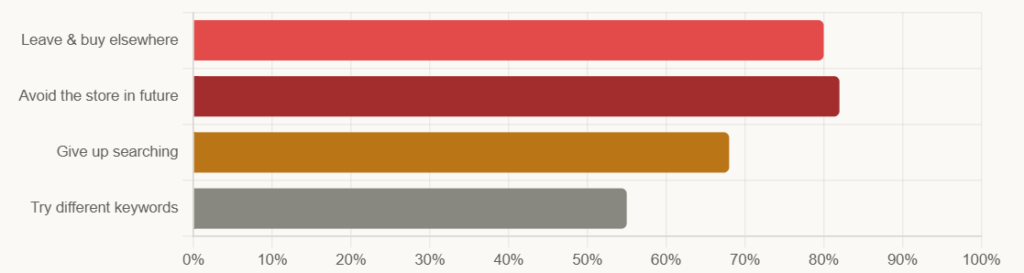
What happens after a bad search experience?
How Powerful Shopify Intelligent Search Can Be?
80% of shoppers who have a bad search experience actively avoid that store in the future. The data related to basic Shopify search and product filters clearly states that stores are at a big loss if they struggle to provide smart product filters and searches on their stores.
- AI-powered Search optimization can increase average conversions by up to 43%
- 92% of shoppers buy what they searched for, and after a successful search, 78% buy at least one more item.
- 72% of e-commerce sites fail to meet basic search expectations and don’t focus on improving search.
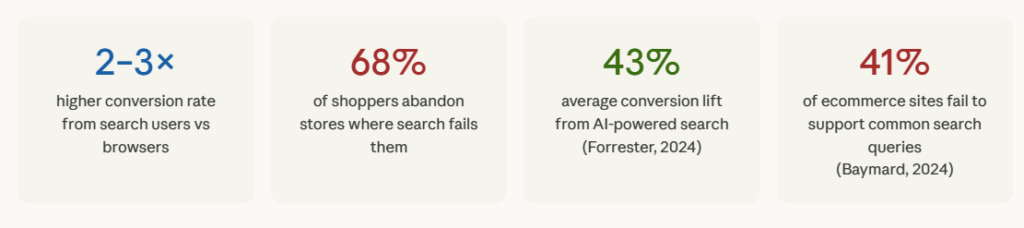
The average Shopify store conversion rate sits around 1.65%. Search users on well-optimised stores convert at 2–3X that rate. The visitors are already there. The purchase intent is already there. The only thing missing is a search experience that can connect the two.
Fixing search is a one-time investment that compounds, unlike running more ads, which requires ongoing spend. Every improvement you make to your search setup keeps working. A synonym you add today keeps matching queries for months. A filter you configure this week keeps helping shoppers find products every day after that.
This is what makes search different from most revenue optimisations: the effort is upfront, and the return is ongoing. The most striking thing about these numbers isn’t their size; it’s that most stores are not doing anything about them. They simply haven’t made that investment yet.
Only 15% of e-commerce companies have dedicated resources to optimising site search. Which means the ones that do have smart product filters and search on their Shopify stores have a clear, durable advantage over everyone in their category who hasn’t.
How Shopify’s Built-In Search Works?
Every Shopify store comes with a built-in search feature. It’s simple, easy to use, and works well for basic needs. But to decide if it’s enough for your store, you need to understand both its strengths and its limitations.
What Shopify’s Native Search Can Do?
Shopify’s default search looks through your product data to find matches. This includes:
- Product titles
- Descriptions
- Tags
- Variants
It also has a predictive search bar, which shows suggestions as customers type. This helps users find products faster.
On collection pages, Shopify also allows basic filters like:
- Price
- Product type
- Availability
For smaller stores with a limited catalog and clear product naming, this setup works fine. For example, if a customer searches for “black t-shirt size M” and your product is tagged correctly, they will likely find it easily.
Where are the Shopify Search and Discovery Struggles?
The issue starts when real customer behavior comes into play. People don’t always search in perfect terms. They:
- Make spelling mistakes
- Use different words (like “sofa” instead of “couch”)
- Search in a more natural or conversational way
- Use colors or attributes that may not match your tags exactly
Shopify’s native search doesn’t handle these situations well. It often needs very exact matching, which means:
- A small typo can show no results
- Different wording may not return relevant products
- Customers may not find what they are looking for
The majority of e-commerce sites fail to support common search queries, especially when it comes to:
- Synonyms
- Typos
- Attribute-based searches (like material, color, or use case)
This is where many stores lose customers.
Shopify Native Search vs Advanced AI Search and Filter Apps
To make it clearer, here’s a simple comparison between Shopify’s default search and what the Shopify intelligent search apps offer:
| Shopify Search and Filter Feature | Shopify Native Search | Advanced Search Apps |
| Keyword matching | Yes | Yes |
| Typo & misspelling handling | Limited | Yes |
| Synonym support (similar words) | Limited | Yes |
| AI-based intent search | No | Yes |
| Price filter | Yes | Yes |
| Advanced filters (tags, metafields) | Limited | Yes |
| Color, image, or SKU search | No | Yes |
| Handling “no results” pages | No | Yes |
| Custom filters for collections | Limited | Yes |
| Search analytics & reports | No | Yes |
| Control over results (pin/boost/hide) | No | Yes |
| Mobile-friendly search experience | Basic | Advanced |
| A/B testing for search | No | Yes |
Click on the linked page to know the 15 best Shopify Apps to increase sales in 2026.
What This Means for Your Store
Shopify’s built-in search is a good starting point. It works well if:
- You have a small catalog
- Your product names are simple and clear
- Customers search using exact terms
But as your store grows, customer behavior becomes more complex. People expect search to understand them, even if they make mistakes or use different words.
That’s where Shopify Intelligent search tools, such as WISER, make a big difference. They help customers find products faster, improve their experience, and ultimately increase your conversions.
What Shopify Intelligent Search Actually Means
Before we move ahead, let’s quickly understand what “intelligent search” really means because this is where most of the difference comes in.
You’ll often hear terms like AI search, smart search, or semantic search. But in simple words, it just means a search that understands what your customer is trying to find, and not only what they type.
Let’s break this down in a practical way.
- Basic Search (default working on Shopify)
Shopify’s default search mostly works by matching exact words. It looks at what the customer types and tries to find the same words in your product titles, tags, or descriptions.
This works only when everything matches perfectly. But real customers don’t search like that.
For example, if a customer searches for “joggers” but your product is listed as “sweatpants,” Shopify may not show it. Similarly, a search for “sofa” may not return products listed as “couch.”
Even though you have the right product, the customer doesn’t see it. This is one of the most common reasons why stores lose sales.
- What Happens with Typos
Now add another real-world problem, typing mistakes. Most shoppers are on mobile. They type quickly, so a few common mistakes are likely to happen, such as:
- “bluse” instead of “blouse”
- “sunglases” instead of “sunglasses”
But Shopify’s basic search often treats these as completely different words. The result? A blank page, when customers don’t find results, they don’t try again, they leave. This is where Shopify intelligent search changes everything.
- How is Intelligent (AI) Shopify personalized search different?
Instead of just matching words, intelligent Shopify search and discovery tries to understand the meaning behind the search. For example, if someone searches, “something to wear for a beach wedding”. They haven’t mentioned a product name. But they have clearly expressed what they need.
A smart shopify search and discovery system understands this intent and shows relevant products like dresses, light fabrics, or occasion wear, even if those exact words are not used in the product title.
This is called intent-based or semantic search, and it’s one of the main reasons why AI-powered search improves conversions so much.
- What Happens When There Are No Results?
Another major issue in most Shopify stores is how “no results” are handled. When the search doesn’t find anything, the user usually sees an empty page. And that’s where the journey ends. But intelligent Shopify search and discovery systems don’t stop there. Instead, they try to guide the customer by:
- Suggesting similar or related products
- Showing popular items
- Correcting spelling mistakes with “Did you mean…”
- Redirecting to relevant categories
This reduces something called zero-result searches, which is one of the biggest hidden reasons behind lost sales.
Why is it important for your store?
At the very basic level, the difference is that Basic search tries to match words, but Shopify Intelligent search tries to understand people, which, in e-commerce, directly impacts your sales. Because when customers can find what they are looking for even if they search imperfectly, they stay longer, explore more, and are far more likely to buy.
Now, you have understood that Shopify Search and discovery helps when customers know exactly what they want. But what about shoppers who are still exploring because there are so many results relevant to their search? This is where product filters become important.
What are Product Filters & Why They Matter?
Product filters are the tools you see on collection pages that help customers narrow down products based on what they need. Things like price range, color options, size, brand, or availability.
They solve a different problem than search.
- Search is used when a customer already knows what they want
- Filters are used when a customer is still exploring and trying to find the right option
Without filters, customers have to scroll through dozens or even hundreds of products. That quickly becomes frustrating and most people won’t spend that much time. They simply leave.
Which Filters Do Shoppers Actually Use?
Not every filter matters equally. Research from Baymard Institute (based on 50,000+ usability sessions) shows that some filters are used far more than others:
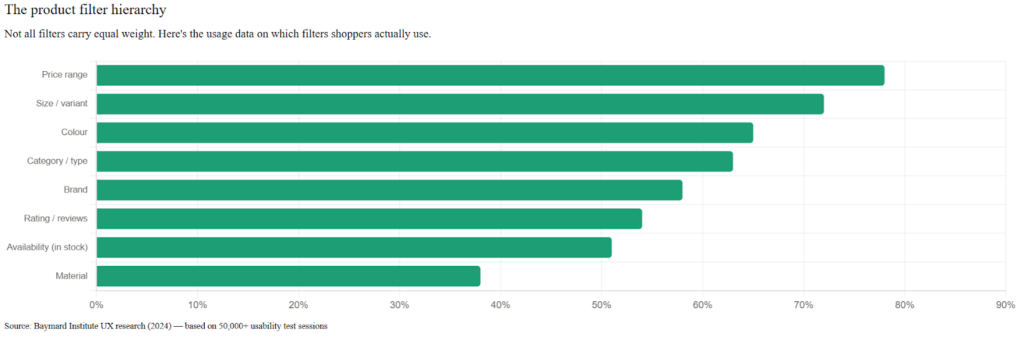
- Price range (78%) – Most shoppers first want to see what fits their budget
- Size or variants (72%) – Very important for clothing, footwear, and home products
- Color (65%) – Especially important for visually-driven categories
- Category or type (63%) – Helps narrow down broad collections
- Brand (58%) – Important for stores selling multiple brands
- Ratings or reviews (54%) – Used when customers are closer to buying
- Availability (51%) – Many shoppers only want to see in-stock products
- Material (38%) – Important for furniture, fashion, and quality-focused buyers
The key point is simple. The right filters depend on your products.
- A clothing store needs size and color filters
- A furniture store needs material, dimensions, and style
- A beauty store needs skin type and ingredient filters
If you use the wrong filters or don’t use filters at all, even a small catalog can feel confusing and hard to browse.
How Shopify Handles Product Filters by Default
Shopify does offer built-in filters through its Online Store 2.0 themes. You can create filters using:
- Product tags
- Variants (like size or color)
- Metafields
- Basic options like price and availability
The good part is that you don’t need any app to set this up. But the problem is flexibility. Shopify’s native filters are quite basic, especially as your store grows.
Common limitations in Shopify default Filters –
- You can’t create dynamic filters that change for different collections
- You can only filter using pre-set metafields, not custom logic
- You can’t hide out-of-stock items properly inside filters
- Showing color swatches instead of text often needs custom development
- Filter experience becomes limited for large or complex catalogs
These issues may not matter for small stores. But as your product range grows, they start affecting how easily customers can find products.
How to know if your Store needs Better Filters?
Without proper filters, a big part of your catalog stays hidden—not because the products are bad, but because customers simply can’t find them. Therefore,-
- If your largest collection has more than 40 products, filters are important
- If it has more than 100 products, filters are essential
Filters are not just a design feature. They directly impact how easily customers can browse your store. A good product filters, saves time, reduces frustration and helps customers find the right products faster. And when customers find what they want easily, they are much more likely to buy.
Now here’s the important part.
Customers don’t just search or just filter. They do both. They search, refine using filters, go back, try different queries, and explore again. But in most stores, Shopify search and product filters don’t work together smoothly.
And that’s exactly where smarter solutions like WISER AI-Powered Product Recommendation for Shopify stores come in.
WISER IntelliSearch – Built for Exactly This Problem
Most search tools on Shopify treat every query the same way. A shopper types a word, the tool looks for products with that word in the title, and returns whatever it finds. If the word doesn’t match exactly, nothing comes back.
IntelliSearch is the Shopify Search and Discovery feature in WISER AI Suite. It works differently. Instead of matching words, it understands what the shopper is actually looking for and that distinction changes everything about what happens next.
What IntelliSearch from WISER does that Standard Search on Shopify doesn’t
When a shopper in your store types “gold chain for women,” IntelliSearch doesn’t just scan for products with those exact words. It reads the intent behind the query. It understands that “gold chain” could also mean “gold necklace,” that “for women” is a filter signal, and that the shopper probably wants to see results by metal type, length, and price, even if they didn’t ask for those filters explicitly.
This is semantic search: understanding meaning rather than matching text. It’s the same technology behind how Google interprets your searches, applied to your product catalog.
Here’s what that looks like in practice across the most common search failures:
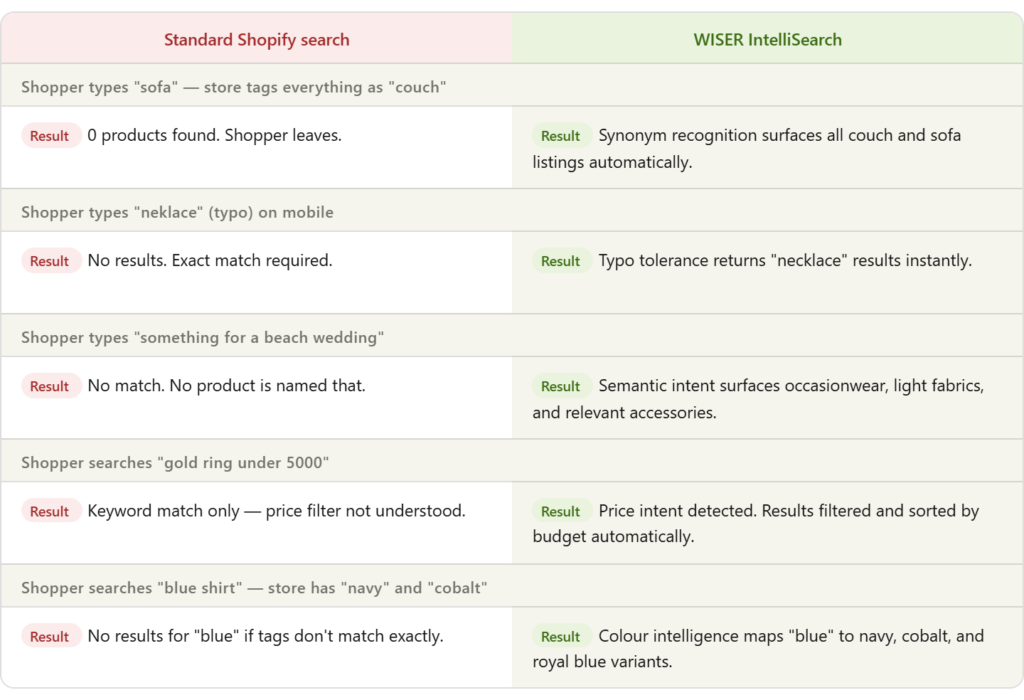
Every scenario in that table is a real search failure that happens on standard Shopify stores every day. Each one represents a shopper with purchase intent who left without buying, not because the product wasn’t there, but because the search experience couldn’t connect them to it. WISER IntelliSearch closes every one of those gaps.
3 Things IntelliSearch does that change search outcomes
- Semantic understanding. IntelliSearch reads the meaning of a query, not just the words. A shopper searching for “running shoes for flat feet” is expressing a need i.e. arch support, stability, specific fit characteristics and not just a product name. IntelliSearch maps that intent to the relevant products in your catalog, even if none of them have those exact words in their title.
- Typo and variant tolerance. Mobile shoppers mistype constantly. “Neklace,” “jewlery,” “bluse” to which standard search returns nothing. IntelliSearch is typo tolerant. It recognises common misspellings, phonetic near-matches, and partial queries, and returns what the shopper clearly meant rather than what they literally typed.
- Behavioral learning. IntelliSearch improves as your store gets more searches. It learns which products shoppers click after which queries, which results lead to purchases, and which searches consistently fail and adjusts its rankings accordingly. A store doing 5,000 searches a month is building a more accurate search engine every single day, automatically.
How Intellisearch Shopify Search And Product Filter Connects to The Rest of The Shopping Journey
Shopify Search and filter and product recommendations work best when they support each other. Search doesn’t end when a shopper finds a product. It’s the entry point to a discovery journey and WISER IntelliSearch is designed with that in mind.
When a customer searches for something and quickly finds the right product, they are already in a buying mindset. This is the perfect moment to show relevant add-ons, which can increase the order value.
For example, a shopper who searches for ‘running shoes’ and finds the right pair is now open to seeing complementary products such as socks, insoles, laces. This is where an AI recommendation engine like Wiser turns a good search experience into a higher-value order.
But this only works if the search experience is smooth. If customers struggle to find products, they are unlikely to explore more or buy extra items.
IntelliSearch is part of the Wiser platform; it connects directly to the recommendation engine already running on your store. When a shopper searches and finds what they’re looking for, Wiser’s broader AI-powered recommendation engine capitalizes this moment and does its most effective work, triggering an active buying mindset by –
- Surfacing “AI Frequently Bought Together” suggestions,
- Personalised cart drawer upsell and cross-sells, and
- Post-purchase upsell recommendations
All informed by the search intent signal that IntelliSearch just captured.
The search query is the ‘DATA’ on what people are looking for, which helps improve both search results and recommendations over time. IntelliSearch captures it, interprets it, and feeds it forward. A shopper who searched “14K gold necklace” and clicked a specific product has told your store something precise about their taste and budget. Every recommendation they see after that moment is shaped by that signal. Simply put, better search leads to better recommendations and higher sales.
This is why Shopify personalized search and product recommendations aren’t separate strategies. In a well-built store, they’re the same strategy: understand what each shopper wants, and show them more of it at every step.
What to expect when you turn IntelliSearch on
Results vary by catalog size and traffic volume, but the pattern is consistent across stores that have made the switch:
- Zero-result searches drop significantly in the first two weeks, as IntelliSearch’s synonym and semantic layer catches the queries that were previously returning nothing.
- Search-to-purchase rate improves as shoppers find relevant products faster and with less friction.
- And the improvement compounds, IntelliSearch’s behavioural learning means month three performs better than month one, without any additional configuration work from you.
The 43% average conversion lift cited by Forrester for AI-powered search optimization reflects exactly this kind of improvement.
It is not a one-time spike but a sustained improvement in how effectively your store connects high-intent visitors to the products they came to buy.
Setting Up WISER IntelliSearch- AI Search and Filter
There is no separate installation for IntelliSearch. It is part of the WISER app. One app, one login, one place to manage it.
If you already have WISER installed on your Shopify store, IntelliSearch is available to you from within the same dashboard you use for product recommendations, upsells, and everything else WISER does.
- Head to your Wiser App Admin Panel first.
- Find the Smart Search section.
- Click the “Enable Wiser Search and Filter” toggle.
- Embed the app theme block directly in your Shopify theme editor, just takes 2 minutes.
If you don’t have WISER yet, you install the app from the Shopify App Store and IntelliSearch comes with it. That’s the entire setup process.
What do you configure once it’s live?
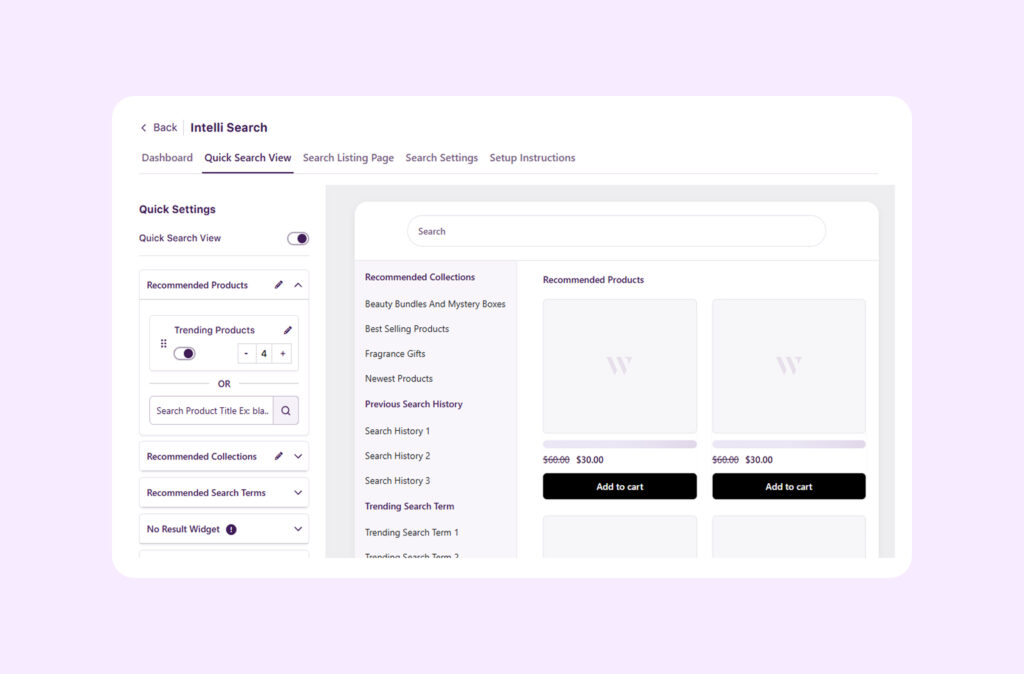
- From the WISER dashboard, you can set up your search bar, build product filters, define synonyms, create merchandising rules, and track search analytics.
- Everything is managed in one place without touching your theme code or involving a developer.
- Filters are built automatically from your existing product data – price, tags, brand, product type, availability, colour, size.
- For large catalogs, this means you’re not configuring hundreds of filter values by hand. IntelliSearch reads your catalog and creates it for you.
What is the Pricing of IntelliSearch?
IntelliSearch is available on WISER plans starting at $9/month. A 14-day free trial is available with no credit card required, giving you full access to search, filters, and analytics from day one.
For most stores, the time from installation to a fully configured, live search experience is measured in hours, not weeks. The results start from day one.
How to Measure Shopify Search and Product Filter Performance?
If people can’t find products easily, they won’t buy. If you want to improve your store’s search and filters, you need to track a few basic numbers. These metrics help you spot exactly where the problem is, what’s working for your store, and what needs fixing.
- Zero-result rate – This shows how often customers search for something and get no results. If this number is high, it means your search is missing products due to poor tagging, missing synonyms, or a weak setup. Ideally, this should be below 2%. Anything above 5% is a warning sign.
- Search abandonment rate – This tells you how many people search but don’t click on any product. That means results are showing, but they are not useful or relevant. In simple terms, customers didn’t like what they saw.
- Search vs browsing conversion – Compare how many people buy after using search vs those who just browse. Usually, search users convert 2–3 times more. If your search conversion is low, it means you’re missing a big revenue opportunity.
- Revenue from search – Look at how much money comes from users who use the search bar. This helps you understand how valuable search really is and why improving it can directly increase sales.
- Filter usage rate – This shows how often people use filters on collection pages. If usage is low, your filters may not be visible or useful. Good filters help customers find products faster, which usually leads to more sales.
Remember, you can’t improve what you don’t measure. Once you start tracking these metrics, patterns become clear. You’ll quickly see where your AI search and filters are falling short, and that’s usually because of a few common mistakes most stores make.
Common Mistakes Stores Make with AI Search and Product Discovery
Many stores set up smart product filters and search once and forget about them. That’s where problems start. Small mistakes in AI search and filters can quietly reduce your sales. Here are some common mistakes and how you can fix them easily
- Ignoring zero-result searches – When customers search and see no results, it’s a direct loss of sales. These are people who already know what they want. Check your search data regularly and fix the most common “no result” searches by improving product titles, tags, or adding synonyms.
- Using too many filters – More filters don’t always mean a better experience. Too many options can confuse customers and slow down decisions. Only keep filters that actually help narrow down products in a meaningful way.
- Not testing on mobile – Most shoppers today use mobile. A search or filter that works fine on a desktop may feel clunky on a small screen. Always test your search bar, results, and filters on mobile to make sure everything is easy to use.
- Setting up search and forgetting it – Search is not a one-time setup. Your products, trends, and customer behavior keep changing. You need to update your search settings, keywords, and filters regularly to keep results relevant.
- Treating search and recommendations separately- Search and product recommendations work best together. Both depend on good product data and tagging. When you improve one, the other also gets better. So it’s smarter to optimize them together instead of treating them as separate tasks.
Check out the 10 common mistakes Shopify store owners make that harm their business.
Your Search Bar is Your Revenue Growth Lever…
Search users usually convert much higher than regular visitors. To put it simply, better search doesn’t just help people find products; it helps Shopify stores sell more.
A good place to start is with a simple audit. Go to your Shopify Analytics and check what customers are searching for. Look at:
- Your most common searches
- Searches that give poor results
- Searches that show no results at all
This data clearly shows where you’re losing sales.
For most stores, fixing just the top 10 zero-result searches can make a big difference. You can do this by improving product titles, adding better tags, and setting up synonyms. Small changes here can start improving conversions within a few weeks.
However, if your store has a large catalog or more complex needs, you can explore advanced search apps. Many of them offer free plans, so you can test and see what works best for your store.
Also, don’t forget the second half of the journey, product recommendations. Once a customer finds what they’re looking for, showing the right suggestions (like related or frequently bought together products) can increase order value.
Tools like Wiser AI upsell apps for Shopify help you do this by connecting search behavior with smart recommendations across product pages, cart, and post-purchase.
Remember, better search helps customers find products and better recommendations help them buy more. When both work together, you turn more of your existing traffic into paying customers, without spending extra on ads.
Check out the Tips to build a performance-driven Shopify store with zero ad spend waste.
Frequently Asked Questions – Shopify Search & Discovery
- What is Shopify Search and Discovery?
Shopify Search and Discovery is a free app that improves site search, adds collection filters, and provides search analytics. It handles synonyms, merchandising rules, and filters for better product discovery. Install from the Shopify App Store to reduce zero-result searches and boost conversions 2-3x. - How does Shopify Intelligent Search work?
Shopify Intelligent Search uses AI to understand shopper intent beyond exact keywords. It handles typos, synonyms, and semantic queries. WISER IntelliSearch adds behavioral learning that improves results over time based on clicks and purchases. - What are the benefits of AI search and product discovery?
AI search delivers 26-50%+ conversion lifts, reduces zero-result searches by 50%+, and increases AOV by 34%. Search users convert 2-3x higher than browsers and spend 2.6x more. 92% buy searched items when results work. - How do I set up WISER IntelliSearch on Shopify?
IntelliSearch comes built into the WISER app (no separate install). In WISER dashboard: Smart Search → Enable toggle → Embed theme block (2 mins). Configure Quick Search dropdowns, filters (price/tags/metafields), and analytics. Live in hours. - What is the difference between Shopify’s native search and AI search and filter apps?
| Feature | Native Search | Shopify AI Search and filter App (WISER) |
| Typo handling | No | Yes |
| Synonyms | Limited | Full |
| Semantic intent | No | Yes |
| Zero-result help | No | Yes |
| Search analytics | No | Yes |
| Filter customization | Basic | Advanced |
- What metrics show poor Shopify search performance?
- Zero-result rate >2% (ideal <2%)
- Search abandonment >30%
- Search conversion <2x browsing rate
- Low filter usage (<20% collection visits)
- Track in Shopify Analytics → Search data.
- Which product filters do shoppers use most?
Price, Size, Color, Type, Brand, Reviews, Availability. Match filters to your catalog, like clothing needs size/color, and furniture needs material/dimensions. - How does the Shopify Search & Discovery app improve conversions?
Adds synonyms, smart filters, merchandising rules, and analytics. Merchants report 35% search-to-purchase lift. Reduces 68% abandonment from poor native search. Search traffic converts 2.5-3% vs store avg 1.65%. - What is semantic search vs keyword matching?
Keyword matching finds exact words (“gold necklace”). Semantic search understands intent (“chain for women” → necklaces + women’s filters). WISER IntelliSearch uses Google-like tech to match meaning, not just text. - How to fix zero-result searches in Shopify?
- Check Analytics → top failed queries
- Add synonyms in Search & Discovery
- Improve product titles/tags
- Enable WISER IntelliSearch typo tolerance
- Target top 10 failures first—fixes 70% of problems.
- Does Shopify support advanced product filters natively?
Yes, but limited to price, tags, variants, and metafields. No dynamic collection filters, color swatches need code, and out-of-stock hiding is inconsistent. Apps like WISER auto-build filters from catalog data. - What is WISER IntelliSearch pricing?
$9/month (WISER base plan). 14-day free trial, no card needed. Includes search, filters, analytics, and recommendations. Scales with store revenue. - How do search and product recommendations work together?
Search captures intent (“14K gold necklace”) → feeds WISER recommendations → shows upsells (“matching earrings”). Search-to-product → Frequently Bought Together → Cart upsell creates 34% AOV lift. - What are common Shopify search and discovery mistakes to avoid?
- Ignoring zero-result analytics
- Too many filters (causes choice paralysis)
- No mobile testing (68% traffic)
- Static setup (no seasonal updates)
- Separating search from recommendations
- When should I upgrade from Shopify’s native search?
Upgrade when:- 40 products per collection
- Zero results>2%
- Search converts <2x browsing
- Complex catalog (fashion, variants)
- International/multi-language needs
- How to measure AI search and filter ROI?
Track: Search abandonment drop, zero-results reduction, search revenue share, AOV lift. $50K store +35% search conversion = $500+/month extra revenue. Pays apps instantly. - Can small Shopify stores benefit from Shopify Intelligent search?
Yes, even 100-product stores see 2x conversion from searchers. Free Search & Discovery app fixes 70% native gaps. WISER $9 plan scales with growth.